

Intelligent automation implementation guide: timelines, roles and pitfalls
A first intelligent automation process, such as invoice processing, claims intake or customer onboarding, typically moves from kickoff to production in three to six months. Scope, data readiness and integration complexity decide where in that range a project lands, far more than the platform itself. Projects that run long usually do so for organizational reasons: unclear ownership, poor sample data, lack of focus, or a scope that grows mid-build.
This guide is for IT directors, automation leads, and enterprise architects planning an intelligent document processing (IDP) or end-to-end process automation rollout. It sets out a phase-by-phase timeline, the roles a project needs, and the pitfalls that most often slow deployments.
Timeline: five phases from discovery to scale
The durations below are typical ranges for a first process of moderate complexity. Each phase ends with a gate, so problems surface before they become expensive.aaa
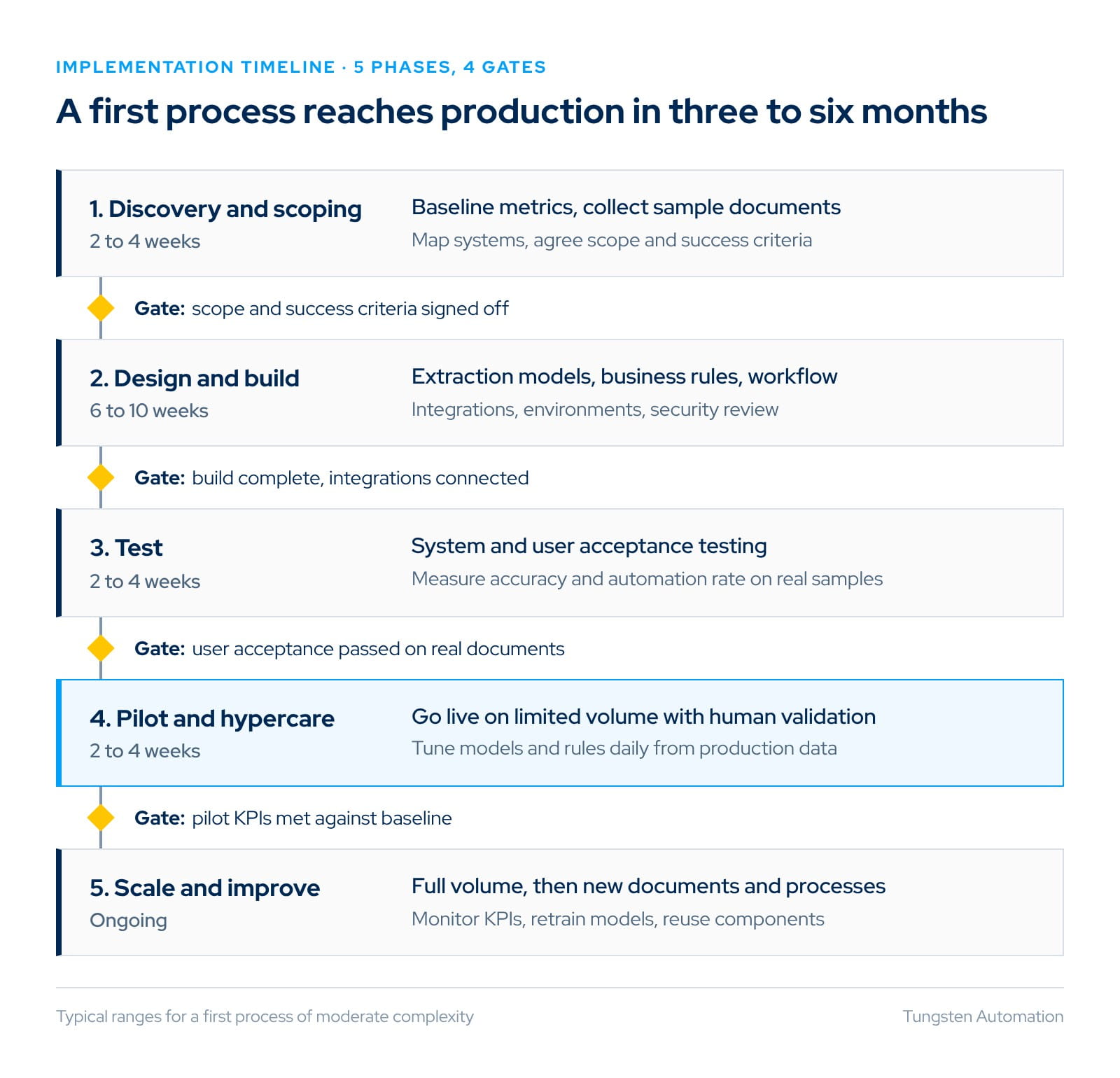
Discovery and scoping decides most of the timeline. Collect several hundred real documents, measure today's volumes, handling times and error rates, and list every system the process touches. Agree measurable success criteria, such as target straight-through processing and accuracy rates, before any build starts.
Design and build is the longest phase. Document classification and extraction usually move quickly, especially with pre-trained models. Integration with ERP, CRM or content systems, business rules and exception workflows take most of the effort.
Testing should use real, unseen documents rather than the samples used to configure the solution. Operations users, not only the project team, should run user acceptance testing.
Pilot and hypercare puts the process live on limited volume, one region or one document type, with human validation for low-confidence fields. Daily tuning in the first weeks raises automation rates quickly.
Scale and improve extends to full volume, then to new document types and processes. Reusing integrations, models and governance makes each later process faster than the first.
Roles: who you need on the team
Small, empowered teams deliver faster than large steering structures. Most first deployments need the roles below, though one person often covers two of them.
| Role | Owns | Time commitment |
|---|---|---|
| Executive sponsor | Business case, priorities, unblocking decisions | A few hours a month |
| Process owner | Requirements, business rules, sign-off on outcomes | Part-time throughout |
| Automation lead or solution architect | Solution design, platform configuration, standards | Full-time during build |
| Integration and IT specialist | ERP, CRM and content system connections, security, environments | Part-time, heavier in build |
| Subject matter experts | Sample documents, exception rules, test cases | Part-time, heavier in design and testing |
| Operations users | User acceptance testing, validation workflow feedback | During testing and pilot |
| Security, risk and compliance | Data handling, access control, audit requirements | Reviews at design and go-live |
| Implementation partner (optional) | Accelerators, delivery capacity, best practice | As contracted |
The process owner is the role most often under-resourced. Without someone who can decide how an exception should be handled, configuration stalls while questions wait for answers.
Pitfalls that slow deployments
Starting with the hardest process. A first project should be valuable but contained: one document family, one or two systems, a measurable outcome. Early success funds and accelerates the next wave.
Testing on clean samples. Extraction models tuned on tidy documents fail on faxes, photos and multi-page bundles. Collect a representative sample early, including the worst documents.
Underestimating integration. Connections to ERP, CRM and content systems usually take longer than document configuration. Engage system owners in discovery, not in testing.
Automating every exception. Chasing 100% automation delays go-live. Route low-confidence fields to a human validation step, go live, and raise automation rates from production data.
Scope creep during build. New document types and rules added mid-project reset testing. Log them for the next release.
No baseline. Without pre-project metrics on volume, handling time and error rates, the business case cannot be proven after go-live.
Treating go-live as the finish line. Models, rules and volumes change. Plan for monitoring, retraining and ownership after hypercare.
How Tungsten shortens time to value
Enterprise automation platforms are sometimes seen as complex to deploy because they cover many capabilities. In practice, the platform choice affects timelines mainly through how much has to be built from scratch.
Tungsten TotalAgility™ combines IDP, process orchestration, RPA, large language models and decision management in one low-code platform, available in public and private cloud environments. Three capabilities target the phases that usually take longest:
- Pre-trained extraction models. The Tungsten Document Library offers more than 3,000 ready-to-use extraction models across banking, insurance, healthcare, supply chain, identity and legal documents, which reduces configuration work in the build phase.
- Generative AI for configuration. Teams can define decision tables, lookup lists and extraction models from example documents or plain-language prompts. Tungsten reports an 80% reduction in development time for extraction models.
- Human-in-the-loop validation. Confidence scores route only uncertain fields to people, so a process can go live before every exception is automated and improve from production data.
Tungsten's DocAI Platform supports a TotalAgility deployment by helping teams turn incoming documents into trusted data, then route that data through connected workflows.
DocAI Studio provides a no-code environment, and more than 300 DocAI Accelerators can help process common document types without starting model training from scratch.
Teams can begin with a focused workflow and expand as needs grow.
For a deeper look at how extraction and validation work, see What is intelligent document processing.
Questions fréquentes (FAQ)
How long does an intelligent automation implementation take?
A first process typically takes three to six months from kickoff to production, including a pilot. Later processes on the same platform are usually faster because integrations, environments and governance already exist.
What is the biggest cause of delay?
Most delays come from integration work, poor sample data and decisions waiting on the business, not from configuring the platform.
Should we use an implementation partner?
A partner adds capacity and accelerators, which helps for a first project or a tight deadline. Build internal skills in parallel so you can own later waves.
How do we measure success after go-live?
Compare production results with your baseline: straight-through processing rate, handling time per document, error rate and cost per transaction. Review them monthly during the first quarter.


Gartner® recognizes Tungsten Automation again as a Leader in the second edition of the Magic Quadrant™ for Intelligent Document Processing (IDP).
Lire le rapportRessources associées

Nous contacter
Contactez un expert Tungsten Automation pour en savoir plus sur nos solutions.

Demander une démo
Grâce à une démo personnalisée, vous découvrirez comment nous pouvons vous aider à favoriser l’innovation, augmenter votre productivité et améliorer vos résultats.