
Power PDF 2026.2 for Mac: Bringing Enterprise Readiness to the Mac Experience
People often associate the Mac with clarity. Not just in how the hardware looks, but in how it feels to work on. A clean desktop. A calm interface. Fewer distractions. A sense that the tool should stay out of your way and let you focus.
That expectation is one of the reasons so many people choose the Mac in the first place.
But business document work does not always feel that way. In the real world, documents need to be reviewed, compared, protected, converted, shared, and governed. They move between people, systems, and devices. They carry sensitive information. They need to support compliance requirements, internal policies, and increasingly, AI-assisted ways of working. And somewhere along the way, the calm, focused experience people expect from the Mac can give way to friction.
That is what makes our latest release so important! With Power PDF 2026.2 for Mac, we are taking a major step forward in bringing a more enterprise-ready PDF experience to Mac users. This release significantly expands what Mac users can do in Power PDF while also strengthening the security, deployment, and workflow capabilities organizations need to support document work at scale.
The largest advancement for Power PDF on Mac – ever.
What matters most, though, is not the size of the release but what it actually represents. For a long time, business software has sometimes treated Mac users as if they needed a lighter version of the real thing. Fewer capabilities. Fewer options. Fewer serious use cases. Enough to participate, but not always enough to lead. That is no longer good enough.
Mac users today are not confined to a creative corner of the business or a small exception inside the broader IT estate. They are distributed across the organization – in legal, finance, operations, compliance, leadership teams, and many other functions. They handle complex documents, regulated information, and cross-platform workflows every day. That means supporting Mac users is no longer about equipping a single department with a separate set of tools. It is about giving organizations a more consistent, business-ready way to support serious document work wherever Mac users are part of the wider workflow.
Power PDF 2026.2 for Mac is built around that idea.
Key Highlights from the Power PDF 2026.2 for Mac Release
-
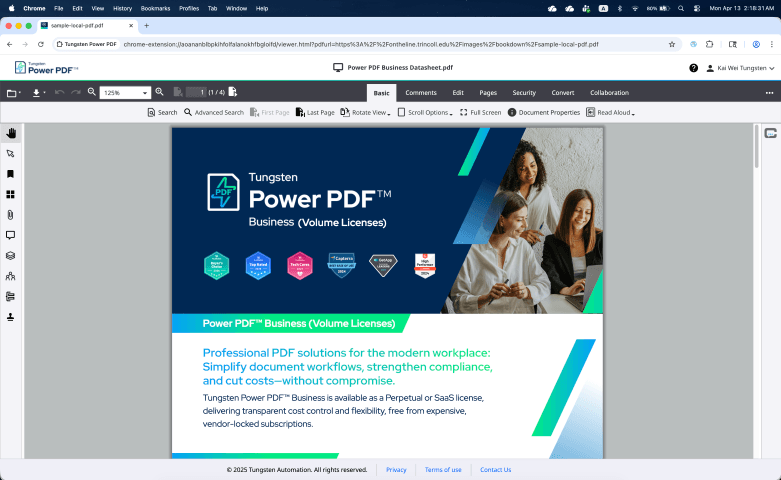
Editor continuity on Cloud and Desktop
Users can now move more easily between the Power PDF Cloud Editor and the desktop application, picking up work in the browser or on the desktop without having to choose between flexibility and full-featured productivity. For organizations investing in Business SaaS, that means a more connected way to work across locations and devices.
-
Better support for real document work
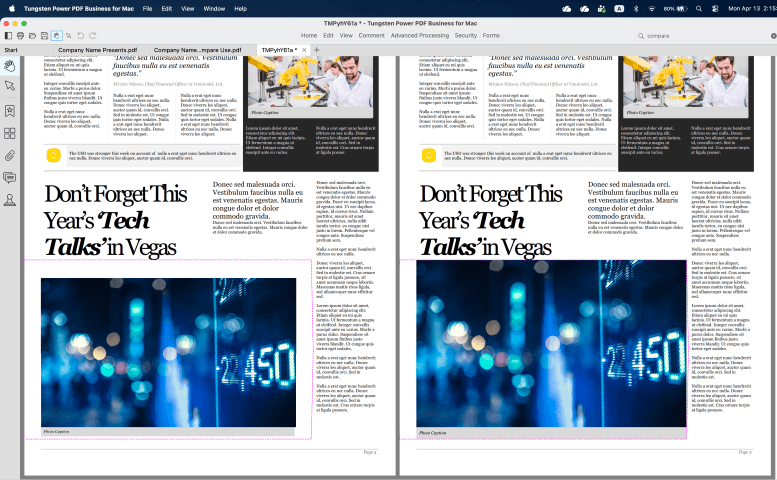
Mac users can now perform batch processing for multiple documents, making it easier to convert, encrypt, print, and handle larger volumes of files efficiently. A new document comparison capability helps users identify differences between file versions, which is especially valuable in legal, compliance, and other detail-sensitive environments. And an enhanced viewing experience introduces multi-window layouts, tabbed document views, and a dedicated reading mode for working with longer or more complex files.
-
Embedded AI Copilots
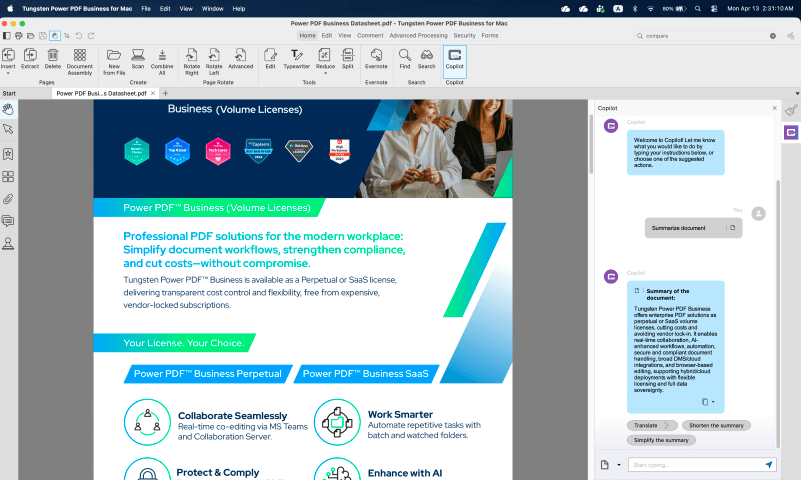
The conversation around AI in document software is often framed as if more is automatically better. In practice, most organizations are asking a more grounded question: How can we use AI in ways that are useful, controllable, and aligned with our own policies? That is why one of the most important additions in this release is our AI Copilot, now also for Mac. With Tungsten’s Bring Your Own AI approach, organizations can connect their own approved AI services to support tasks such as summarization, content extraction, and intelligent document analysis. The benefit is not just productivity. It is the ability to adopt AI on your own terms, with your own governance and provider choices still in place. That same principle of usable, enterprise-controlled AI also runs through the broader Power PDF roadmap.
-
Improved Security and governance
Power PDF 2026.2 introduces native Microsoft Purview protection integration, helping organizations extend document security, protection policies, and enterprise-grade DRM support more consistently to Mac users. That matters because enterprise readiness is not just about giving users more features. It is also about making sure the documents they work with remain protected inside the policies and frameworks the organization already depends on. The current roadmap reinforces that direction as well, with a longer-term focus on expanded enterprise information protection and compliance capabilities.
-
Smoother deployments
There is something that often matters most to IT teams even when end users never notice it: deployment. A business-ready Mac story is not complete if the software is difficult to roll out, recover, or manage centrally. That is why this release also introduces IT-friendly deployment options, including silent deployment, centralized configuration, and recovery tools designed to reduce operational overhead during larger rollouts. That is not the most glamorous part of the launch. But in many organizations, it is one of the most meaningful.
Taken together, these changes point to something bigger than a feature list.
They reflect a simple belief: professional PDF work on the Mac should feel fully part of the business, not adjacent to it. It should support the same standards, the same control, and the same seriousness of purpose that organizations expect from any enterprise-ready document workflow.
That does not mean making the Mac feel less like a Mac. If anything, it means respecting why people chose it in the first place – and extending that experience into more demanding environments with less compromise.
What's next in Power PDF
We are not done. Looking further ahead, the broader direction for Power PDF includes more contextual AI across document sets, stronger enterprise control over AI and information protection, broader support for industry-specific workflows, and a more unified experience across operating systems. The goal is not to chase novelty for its own sake, but to keep reducing friction in the places where serious document work still needs better answers.
For Mac users, that journey takes an important step forward with Power PDF 2026.2.
For organizations supporting them, it means something just as important: one less compromise between the experience users want and the readiness the business requires.


Découvrez les avantages de Tungsten Power PDF pour Mac
Download trial
Nous contacter
Contactez un expert Tungsten Automation pour en savoir plus sur nos solutions.

Demander une démo
Grâce à une démo personnalisée, vous découvrirez comment nous pouvons vous aider à favoriser l’innovation, augmenter votre productivité et améliorer vos résultats.